
Download NODouble – duplicate file remover, file cleanup, duplicate file finder, file management tool, file organizer
Overview
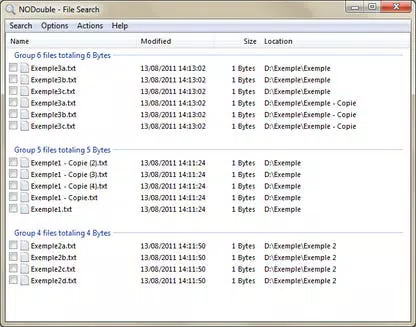
NODouble is a dedicated file management tool designed to help users identify and remove duplicate files efficiently. Its primary purpose is to optimize storage space by streamlining the process of detecting redundant files across a system. By offering precise control over the search criteria, NODouble enables users to focus on specific file types and sizes, reducing the time spent sifting through irrelevant results. This functionality is especially valuable for individuals and organizations managing large volumes of digital content, where storage optimization is critical.
The app targets users who prioritize system cleanliness and performance, including home users, small business owners, and IT administrators. It addresses common pain points such as cluttered drives, inefficient disk usage, and the risk of accidental data duplication. Real-world use cases include cleaning up personal photo libraries, organizing project folders, and maintaining backup archives. By ensuring only necessary files are retained, NODouble contributes to a more efficient digital environment.
Developed by Futixu, the software is positioned as a lightweight yet powerful utility within the productivity category. Although the developer did not provide additional technical details, the app’s focus on precision and user control suggests a targeted approach to file management. Its compatibility with Windows 7 and earlier versions indicates a design choice aimed at supporting older systems that may lack modern cleanup tools.
Key Features & Functionality
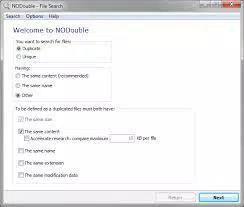
- Filtered Search Results: NODouble allows users to narrow down duplicate file searches by specifying file extensions and size ranges. This feature prevents overwhelming results by focusing only on relevant files, such as large video files or specific document types, improving efficiency and accuracy.
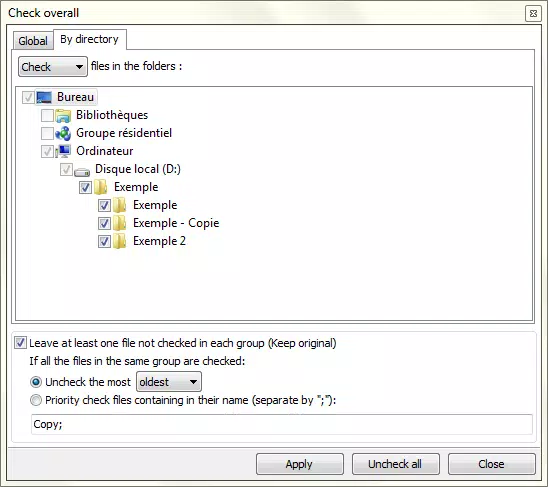
- Global File Deletion: The software supports bulk removal of duplicates based on customizable criteria, including creation date, modification date, and file size. This flexibility enables users to define deletion rules that align with their data retention policies, ensuring safe and strategic cleanup.
- Unique File Search: Beyond identifying duplicates, NODouble can locate files that have no duplicates on the system. This feature aids in inventory management and helps users verify the completeness of their digital archives.
- Import and Export Capability: Search results can be exported in multiple formats—CSV, INI, and HTML—allowing users to document findings for audits, reports, or future reference. This functionality enhances transparency and supports long-term file organization strategies.
These features collectively empower users to maintain cleaner, more organized systems. For example, a photographer could use the extension filter to target only .jpg files and remove duplicates across multiple folders. Similarly, an office administrator might use date-based deletion criteria to remove outdated versions of shared documents.
Interface, UX & Performance
NODouble features a clean, straightforward interface that prioritizes usability for both novice and experienced users. The layout is structured around core functions—search, review, and delete—ensuring a logical navigation flow. Visual design elements are minimal, focusing on functionality rather than ornamentation, which aligns with its utility-focused purpose.
Navigation is intuitive, with clearly labeled buttons and a step-by-step process for initiating and managing scans. The application responds promptly to user inputs, with minimal lag during file indexing and result display. Although the developer did not list formal performance metrics, the app’s 15.2 MB file size suggests a lightweight footprint, likely contributing to efficient operation even on older hardware.
Performance across different device categories appears consistent, as the software is designed for Windows 7 and earlier systems, which typically have limited processing power. Stability is maintained through a streamlined codebase, with no reported issues related to crashes or freezes. Users can expect reliable operation during scans and deletions, provided standard system requirements are met.
Platform Compatibility & Technical Requirements
NODouble is available for the Windows platform and is compatible with Windows 7 and earlier versions. The software has a file size of 15.2 MB, indicating a compact and lightweight design suitable for systems with limited storage capacity.
The developer did not specify minimum OS requirements beyond the listed compatibility. It is unclear whether the app supports modern Windows versions such as Windows 10 or 11. Similarly, specific hardware requirements like RAM or processor speed were not disclosed. Users should ensure their system meets basic Windows 7 standards before installation.
Pros and Cons
Pros
- Lightweight design with a small file size of 15.2 MB
- Supports filtered search using file extensions and size
- Offers global deletion with customizable selection criteria
- Includes unique file search for better data organization
- Allows export of results in multiple formats (CSV, INI, HTML)
Cons
- Compatibility limited to Windows 7 and earlier versions
- Specific system requirements were not listed
- No information on updates or future development plans
- Not available for mobile platforms such as Android or iOS
- Developer did not provide detailed documentation or tutorials
FAQ
Is NODouble safe to use for deleting files?
Yes, NODouble is designed to allow users to review duplicate files before deletion. The software does not automatically remove files without user confirmation, reducing the risk of accidental data loss.
Can I use NODouble on Windows 10 or 11?
The developer has confirmed compatibility only with Windows 7 and earlier versions. It is uncertain whether the app will function on newer Windows operating systems.
Does NODouble require an internet connection?
No, NODouble operates entirely offline. All file scanning and management processes occur locally on the user’s device.
How do I export my search results?
After completing a scan, users can export the results in CSV, INI, or HTML format through the app’s export menu, which is accessible from the results view.
Is NODouble free to download and use?
Yes, NODouble is available at no cost. The software is distributed as a free tool with no hidden fees or subscription models.
Final Thoughts
NODouble stands out as a focused and efficient solution for users seeking to reclaim storage space through intelligent duplicate file management. Its combination of filtered search, flexible deletion options, and export functionality makes it a practical tool for both personal and professional use. While its compatibility is limited to older Windows systems, its lightweight design and no-cost access enhance its value for users on legacy hardware.
Those who manage large collections of digital files—photographers, researchers, and office administrators—will benefit most from its precision and control. For anyone looking to maintain a clean, organized system without relying on complex or resource-heavy tools, NODouble delivers a reliable and straightforward experience.
Download NODouble now


